Make the right input easier.
Guide formatting with input masks and protect values with read-only settings. Keep the ACF input types your editors already know.
FIELDS. RECORDS. WORKFLOWS.
Validate inputs, connect records, and bring calculations and approvals into WordPress. Start with a Free foundation, then add Pro for the work that comes next.
One field. A stronger foundation.
Guide formatting with input masks and protect values with read-only settings. Keep the ACF input types your editors already know.
Check values with regex or PHP. Add conditional requirements, defaults and business validators to fit the way your content works.
Catch duplicate values within a post, post type, field key or across the site. Keep identifiers aligned across translation families.
FROM INDIVIDUAL FIELDS TO CONNECTED RECORDSFREE
Create objects, connect related records and give each person the right access. Build a project tracker, a contact workspace or a structured editorial process inside WordPress.
PROJECT RECORD
A CLOSER LOOK
Define your fields, find your records and make the next edit in one workspace. Take a look at the tools behind the tour.
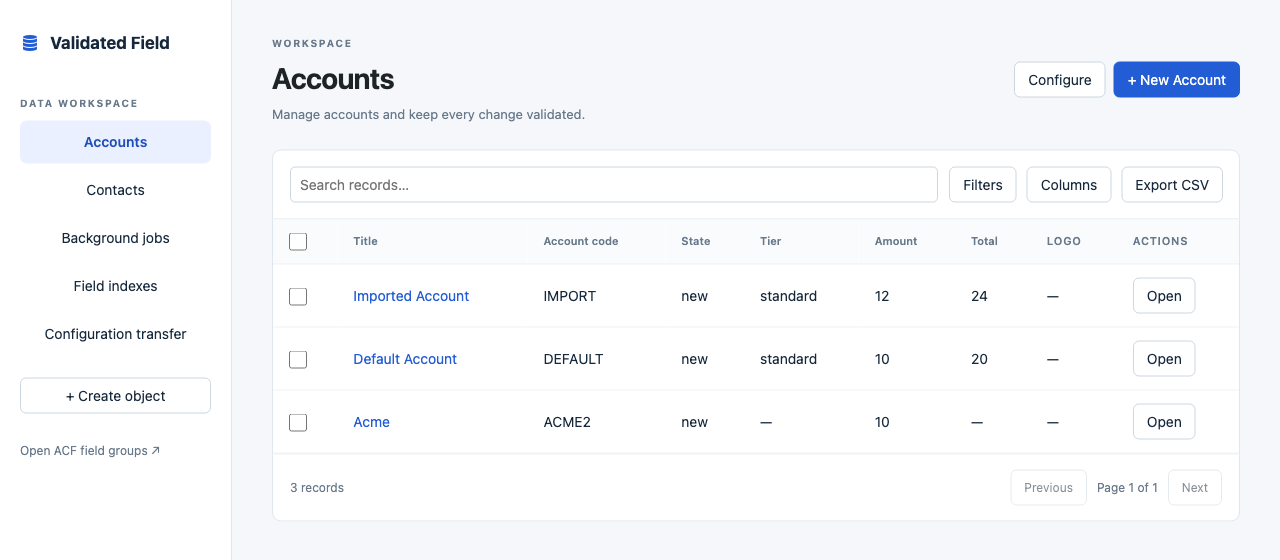
Browse objects, search and filter records, choose your columns and export data from the same workspace.
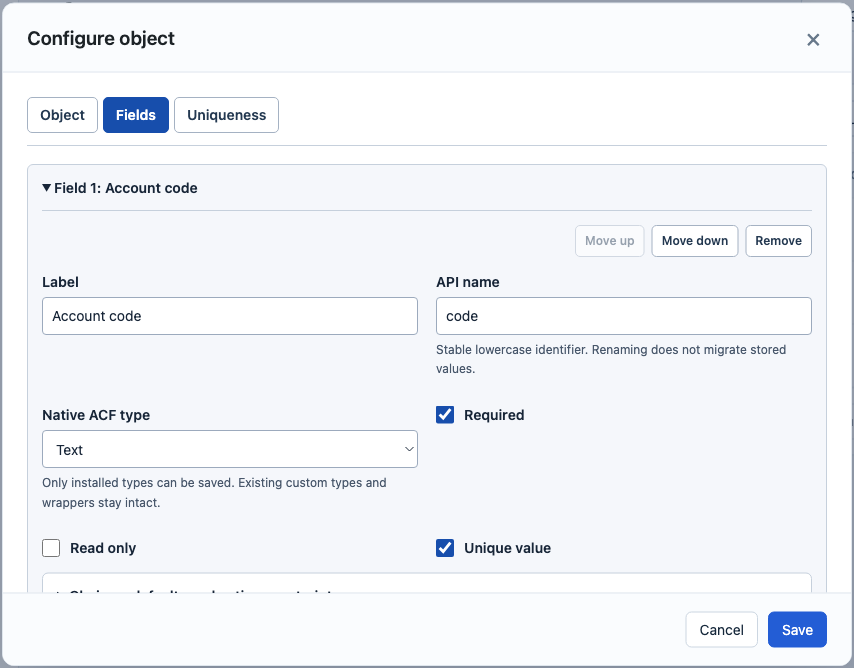
Choose a native ACF input, set required and read-only behavior, and define which values need to be unique.
Scroll the image to explore the details →
KEEP THE FOUNDATION. ADD PRO.
When your records need to calculate, move through approvals or turn into actions, Pro brings those tools into the same workspace.
Use formulas for calculated values and rollups for related records. Bring line items into a total your team can work with.
Define approval stages and record transitions. Trigger email, signed webhooks and record actions as the work moves forward.
Save the views your team uses every day. Edit inline, make bulk changes, and shape rules and layouts with visual designers.
Pro installs alongside Free and builds on the same records, validation and permissions.
WORDPRESS AT THE CENTER. YOUR NEXT BUILD AHEAD.
Read and write managed records through REST. Add Pro for generated GraphQL, TypeScript client types, reusable views and signed previews. Keep your record model and permissions in one place.
Compare the connected toolsTHE COMPLETE FEATURE TOUR
Explore the details by category. Free covers the foundation; the Pro labels show where you can take the workflow next.
33 features / 6 categories / Free + Pro
Guide structured text entry, including phone numbers and other formatted values.
Check submitted values against patterns and custom administrator-defined logic.
Choose site-wide, post-type, field-key or single-post uniqueness scopes.
Control required, read-only and default values with field conditions.
Use business presets and declarative rules for your data model.
Retain native input settings and formatting inside groups, repeaters and flexible-content layouts.
Define managed objects, configure their fields and edit records inside WordPress.
Connect records with target, cardinality and deletion rules.
Apply access policies, ownership rules and team permissions.
Apply shared validation, transactional unique claims and record version checks.
Use Polylang translation-family uniqueness and top-level copy, manual-translation and synchronization settings.
Calculate derived values from the fields in your records.
Bring values from related records into a calculated result.
Run record actions, send email and call signed webhooks, with queue and retry tools.
Define the stages records move through and the actions associated with them.
Add ACF columns to posts, pages and custom post types while keeping their native editors, visibility and field identities.
Edit text, numbers and boolean values, Quick Add a validated record, and remember your own column visibility, order and widths.
Create personal or shared views, assign them to users or roles, choose defaults and duplicate useful views.
Combine sort priorities, nested AND/OR rules, relative dates and authorized relationship names. Calculate metrics across filtered results.
Edit media, relationships, multiple choices and structured ACF values. Add formatting rules with visible text labels.
Author advanced rules, access policies, relationships and record layouts.
Export the records and configuration your permissions allow.
Keep a permission-filtered record of changes.
Bring records into the workspace and update matching entries.
Restore a previous record revision through the shared record services.
Review configuration changes, import definitions and apply them to the workspace.
Preview selected or matching records, apply validated transforms, track outcomes and recover changes with version checks.
Run bounded background exports with raw or formatted values. Scan existing records for invalid values, missing fields, broken references and duplicates.
Access managed CRUD, record forms and schema metadata through REST.
Use validated wrapper fields with native ACF GraphQL integration and field access checks.
Expose managed record types and operations through the generated application API.
Generate client types for the record model your frontend uses.
Use headless views and share signed preview links for publishing workflows.
YOUR NEXT STEP
Validated Field adds masks, validation and uniqueness to native ACF inputs. Both Validated Field editions work with ACF Free or ACF Pro. Use ACF Pro for input types that require that edition.
Free includes the original field validation, conditional and business rules, managed records, permissions, relationships, basic lists, exports and filtered audit history. It is the shared foundation for Pro.
Choose Pro when you need calculations, automated actions, approvals, visual designers, saved views, richer inline or bulk editing, imports, audit restore or generated application APIs. Compare every Pro addition to find the tools for your next project.
BUILD ON A STRONGER FOUNDATION
Calculations, approvals, advanced editing and connected applications. Bring the work behind your content into WordPress.